> ## Documentation Index
> Fetch the complete documentation index at: https://docs.threataware.com/llms.txt
> Use this file to discover all available pages before exploring further.
# Welcome
> Agentless cyber asset management — discover every device, validate every security control, automate every gap
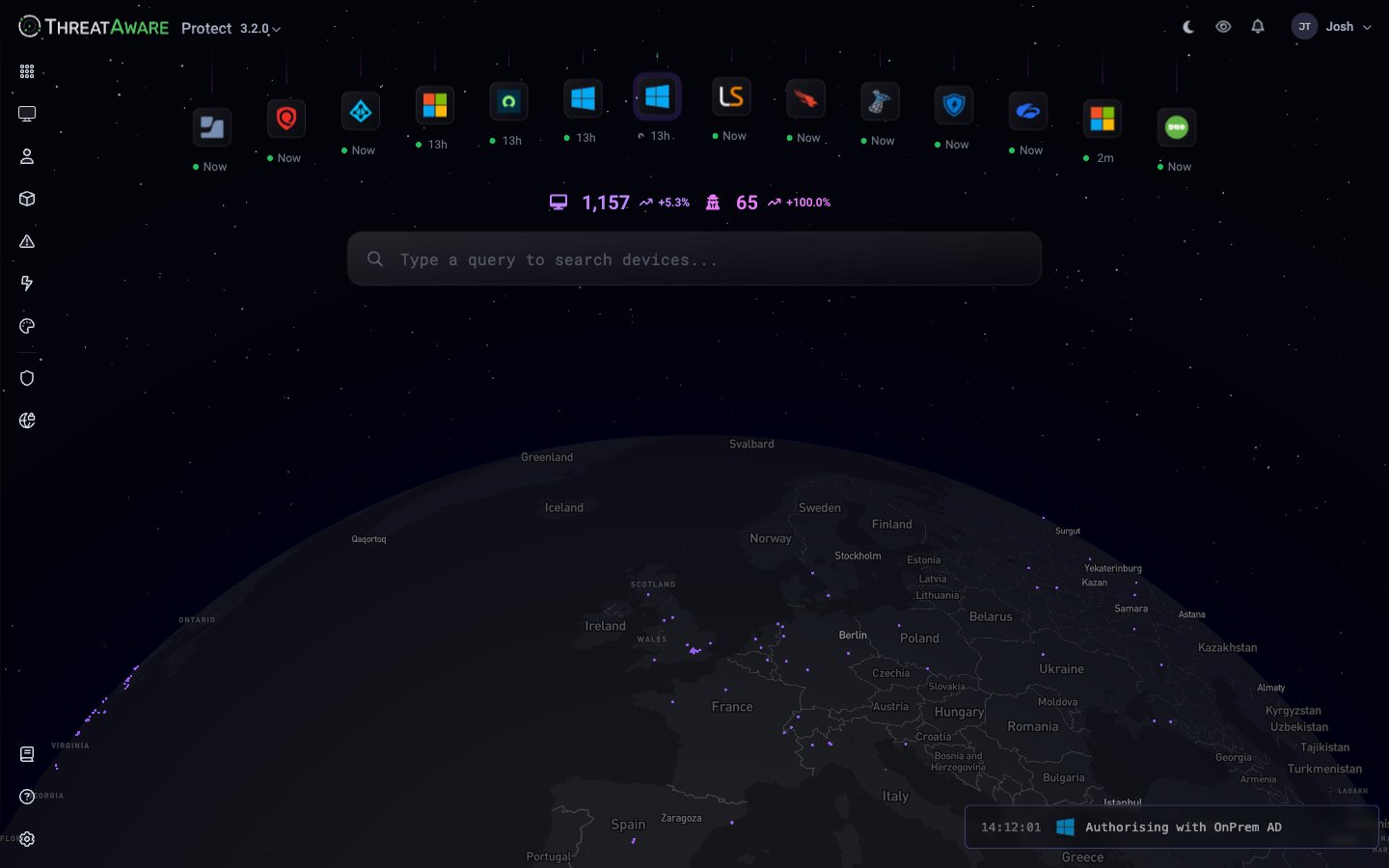 **Evaluating ThreatAware?** Start with the [Platform Overview](/platform-overview) for the 5-minute conceptual tour, then talk to your account team about a guided demo. The rest of this page is the wayfinding map for customers already onboarded.
## What is ThreatAware Protect?
**ThreatAware Protect** is an agentless cyber asset management platform. It pulls device data from every tool your organisation already runs — Endpoint Detection and Response (EDR), Mobile Device Management (MDM), identity provider, vulnerability scanner, Remote Monitoring and Management (RMM), network scanner — and answers the question your security team is always asking: ***is every device protected, and how do we know?***
Three things make it different:
100% API-based. You don't deploy anything to endpoints — Protect reads from the consoles you already manage.
Devices are matched and deduplicated across every connected source. The same laptop appears once, not five times.
Goes beyond "is the agent installed?" to "is the agent actually reporting, configured correctly, and protecting this device?"
## Quick definitions
A handful of Capital-Noun features come up repeatedly on this page. Quick definitions (full reference in the [Glossary](/reference/glossary)):
| Term | Quick meaning |
| --------------------- | ----------------------------------------------------------------------------------------------------------------------------------------------------- |
| **Vital** | One integration's view of one device's control state — Deployed + Functioning + Configured. See [Security Monitoring (Vitals)](/security-monitoring). |
| **Action** | A monitored set of devices tracked through to remediation, with optional outbound automation. Lives in the **Action Center**. |
| **Continuous Action** | An always-on Action — re-evaluates after every sync, suits ongoing hygiene. |
| **Snapshot Action** | A fixed-scope, time-bound Action — captured at creation, suits projects with a deadline. |
| **Action Center** | The `/action-center` page where Actions live and outbound automations are wired. |
| **Logic Engine** | The rule editor that drives dynamic [Tag](/tags-and-logic-engine) membership, used to scope Vitals and Actions. |
## The shape of the platform
Protect organises around these primary surfaces. Most are direct left-rail destinations; **Device Explorer** is the default landing route after sign-in but isn't in the main rail.
| Icon | Section | What it answers |
| -------------------------------------------- | --------------------- | ------------------------------------------------------------------ |
| 🌍 Device Explorer | `/device-explorer` | *Where in the world are my devices, and what's syncing right now?* |
| 📊 [Dashboard](/platform-overview#dashboard) | `/dashboard` | *What's the headline of my security posture?* |
| 💻 [Devices](/device-management) | `/devices` | *Find any device, slice the estate, build views.* |
| 👤 [User Inventory](/user-inventory) | `/user-inventory` | *Who owns what, and which apps do they touch?* |
| 📦 [Software Inventory](/software-inventory) | `/software-inventory` | *What's installed across the estate?* |
| ⚠️ [Issues](/issues) | `/issues` | *What's broken, by severity, right now?* |
| ⚡ [Action Center](/automation) | `/action-center` | *What automated workflows are running and how are they tracking?* |
| 🎨 [Reporting](/reporting) | `/studio/editor` | *Custom dashboards built with AI.* |
A **⚙️ Settings** cog sits at the bottom of the left rail. Pinned Studio apps sit above the cog, so a published dashboard becomes a first-class navigation item alongside Devices and Issues.
This documentation covers **ThreatAware Protect** — the asset, vitals, and remediation platform.
## Your first hour
Five minutes to grasp the data flow, deduplication model, and three-stage vitals — everything else builds on those concepts. Start at [Platform Overview](/platform-overview).
Connect Microsoft Entra ID, your primary EDR, and Active Directory. These three integrations give you \~80% of estate visibility on day one. See [Onboarding](/onboarding).
Once you're signed in, an in-product tour walks you through every Dashboard panel — nine screens, two minutes. See the [Tour](/tour) page for the walkthrough; not signed in yet, start with [Onboarding](/onboarding).
Vitals validate that controls are actually working. Start with EDR (CrowdStrike, Defender, or SentinelOne) and one MDM (Intune or Jamf). See [Security Monitoring](/security-monitoring).
Begin with an **email Action** before automating remediation. Validate the query, then layer in tickets, webhooks, or Power Automate. See [Action Center](/automation).
## Who Protect is for
| Role | What Protect does for you |
| ---------------------- | ------------------------------------------------------------------------------------------------------------------ |
| **Security Analysts** | Find missing controls, broken agents, and coverage gaps invisible inside any single console |
| **Security Engineers** | Replace nightly spreadsheets with continuous, accurate, cross-tool inventory |
| **SecOps Managers** | Track EDR coverage, Multi-Factor Authentication (MFA) enrolment, patch SLA, and compliance scores in one dashboard |
| **Compliance Leads** | Produce auditor-ready evidence — Cyber Essentials, ISO 27001, NIST CSF, CIS Controls |
| **MSPs / MSSPs** | Operate multiple tenants, share filtered views with clients, automate monthly reports |
| **Developers** | Hit the REST API or build custom dashboards in [Reporting](/reporting) without writing React from scratch |
## What you can build with Protect
* **Coverage dashboards** — "How many laptops don't have CrowdStrike *and* haven't been seen in MDM for 14 days?"
* **Broken agent reports** — Detect the silent-failure case where EDR is "installed" but stopped reporting weeks ago
* **OS migration trackers** — Snapshot Action: 1,234 Windows 10 devices, deadline Q4, ticking down to zero
* **Compliance scorecards** — Tag-based requirements: laptops need EDR + encryption, servers need EDR + patching
* **MSP client reports** — Filtered views per client tag, scheduled CSV/JSON/XLSX delivery
* **Custom apps** — [Reporting](/reporting) builds React applications over your data with natural-language prompts
## Core features
Unified table of every device, deduplicated across every tool, with hundreds of fields and a powerful query language
Three-stage validation — Deployed → Functioning → Configured — across every connected security control
Real-time list of every detected problem with severity, product, and remediation context
Continuous + Snapshot actions, automation templates, MTTR tracking, full automation log
EDR, MDM, directory, ITSM, vulnerability, network — connect in minutes via API or PowerShell relay
Conversational AI builds custom dashboards over your data — no code, instant publish
## Resources
[help@threataware.com](mailto:help@threataware.com)
Programmatic access
Step-by-step for 100+ integrations
**Evaluating ThreatAware?** Start with the [Platform Overview](/platform-overview) for the 5-minute conceptual tour, then talk to your account team about a guided demo. The rest of this page is the wayfinding map for customers already onboarded.
## What is ThreatAware Protect?
**ThreatAware Protect** is an agentless cyber asset management platform. It pulls device data from every tool your organisation already runs — Endpoint Detection and Response (EDR), Mobile Device Management (MDM), identity provider, vulnerability scanner, Remote Monitoring and Management (RMM), network scanner — and answers the question your security team is always asking: ***is every device protected, and how do we know?***
Three things make it different:
100% API-based. You don't deploy anything to endpoints — Protect reads from the consoles you already manage.
Devices are matched and deduplicated across every connected source. The same laptop appears once, not five times.
Goes beyond "is the agent installed?" to "is the agent actually reporting, configured correctly, and protecting this device?"
## Quick definitions
A handful of Capital-Noun features come up repeatedly on this page. Quick definitions (full reference in the [Glossary](/reference/glossary)):
| Term | Quick meaning |
| --------------------- | ----------------------------------------------------------------------------------------------------------------------------------------------------- |
| **Vital** | One integration's view of one device's control state — Deployed + Functioning + Configured. See [Security Monitoring (Vitals)](/security-monitoring). |
| **Action** | A monitored set of devices tracked through to remediation, with optional outbound automation. Lives in the **Action Center**. |
| **Continuous Action** | An always-on Action — re-evaluates after every sync, suits ongoing hygiene. |
| **Snapshot Action** | A fixed-scope, time-bound Action — captured at creation, suits projects with a deadline. |
| **Action Center** | The `/action-center` page where Actions live and outbound automations are wired. |
| **Logic Engine** | The rule editor that drives dynamic [Tag](/tags-and-logic-engine) membership, used to scope Vitals and Actions. |
## The shape of the platform
Protect organises around these primary surfaces. Most are direct left-rail destinations; **Device Explorer** is the default landing route after sign-in but isn't in the main rail.
| Icon | Section | What it answers |
| -------------------------------------------- | --------------------- | ------------------------------------------------------------------ |
| 🌍 Device Explorer | `/device-explorer` | *Where in the world are my devices, and what's syncing right now?* |
| 📊 [Dashboard](/platform-overview#dashboard) | `/dashboard` | *What's the headline of my security posture?* |
| 💻 [Devices](/device-management) | `/devices` | *Find any device, slice the estate, build views.* |
| 👤 [User Inventory](/user-inventory) | `/user-inventory` | *Who owns what, and which apps do they touch?* |
| 📦 [Software Inventory](/software-inventory) | `/software-inventory` | *What's installed across the estate?* |
| ⚠️ [Issues](/issues) | `/issues` | *What's broken, by severity, right now?* |
| ⚡ [Action Center](/automation) | `/action-center` | *What automated workflows are running and how are they tracking?* |
| 🎨 [Reporting](/reporting) | `/studio/editor` | *Custom dashboards built with AI.* |
A **⚙️ Settings** cog sits at the bottom of the left rail. Pinned Studio apps sit above the cog, so a published dashboard becomes a first-class navigation item alongside Devices and Issues.
This documentation covers **ThreatAware Protect** — the asset, vitals, and remediation platform.
## Your first hour
Five minutes to grasp the data flow, deduplication model, and three-stage vitals — everything else builds on those concepts. Start at [Platform Overview](/platform-overview).
Connect Microsoft Entra ID, your primary EDR, and Active Directory. These three integrations give you \~80% of estate visibility on day one. See [Onboarding](/onboarding).
Once you're signed in, an in-product tour walks you through every Dashboard panel — nine screens, two minutes. See the [Tour](/tour) page for the walkthrough; not signed in yet, start with [Onboarding](/onboarding).
Vitals validate that controls are actually working. Start with EDR (CrowdStrike, Defender, or SentinelOne) and one MDM (Intune or Jamf). See [Security Monitoring](/security-monitoring).
Begin with an **email Action** before automating remediation. Validate the query, then layer in tickets, webhooks, or Power Automate. See [Action Center](/automation).
## Who Protect is for
| Role | What Protect does for you |
| ---------------------- | ------------------------------------------------------------------------------------------------------------------ |
| **Security Analysts** | Find missing controls, broken agents, and coverage gaps invisible inside any single console |
| **Security Engineers** | Replace nightly spreadsheets with continuous, accurate, cross-tool inventory |
| **SecOps Managers** | Track EDR coverage, Multi-Factor Authentication (MFA) enrolment, patch SLA, and compliance scores in one dashboard |
| **Compliance Leads** | Produce auditor-ready evidence — Cyber Essentials, ISO 27001, NIST CSF, CIS Controls |
| **MSPs / MSSPs** | Operate multiple tenants, share filtered views with clients, automate monthly reports |
| **Developers** | Hit the REST API or build custom dashboards in [Reporting](/reporting) without writing React from scratch |
## What you can build with Protect
* **Coverage dashboards** — "How many laptops don't have CrowdStrike *and* haven't been seen in MDM for 14 days?"
* **Broken agent reports** — Detect the silent-failure case where EDR is "installed" but stopped reporting weeks ago
* **OS migration trackers** — Snapshot Action: 1,234 Windows 10 devices, deadline Q4, ticking down to zero
* **Compliance scorecards** — Tag-based requirements: laptops need EDR + encryption, servers need EDR + patching
* **MSP client reports** — Filtered views per client tag, scheduled CSV/JSON/XLSX delivery
* **Custom apps** — [Reporting](/reporting) builds React applications over your data with natural-language prompts
## Core features
Unified table of every device, deduplicated across every tool, with hundreds of fields and a powerful query language
Three-stage validation — Deployed → Functioning → Configured — across every connected security control
Real-time list of every detected problem with severity, product, and remediation context
Continuous + Snapshot actions, automation templates, MTTR tracking, full automation log
EDR, MDM, directory, ITSM, vulnerability, network — connect in minutes via API or PowerShell relay
Conversational AI builds custom dashboards over your data — no code, instant publish
## Resources
[help@threataware.com](mailto:help@threataware.com)
Programmatic access
Step-by-step for 100+ integrations