> ## Documentation Index
> Fetch the complete documentation index at: https://docs.threataware.com/llms.txt
> Use this file to discover all available pages before exploring further.
# Integrations
> Connect Protect to 100+ security and IT platforms via API or PowerShell relay — read-only, hourly sync
## How integrations show in Protect
At [Settings → Integrations](/settings/integrations) (URL `/settings/connections`) you'll see a card per integration:
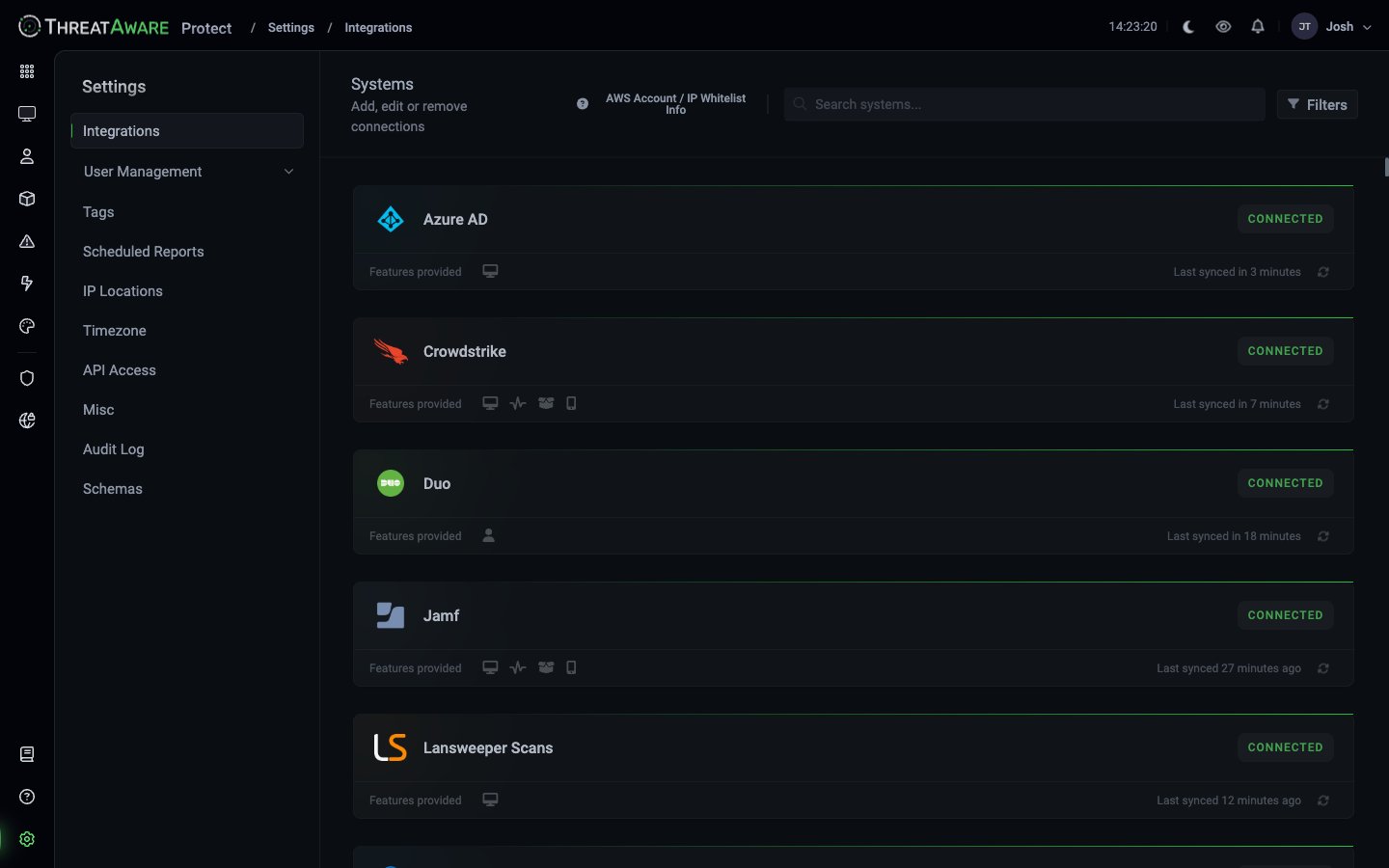 Each card shows:
| Element | Meaning |
| ----------------------------------- | --------------------------------- |
| Logo + name | Vendor identification |
| **CONNECTED / NOT CONNECTED** badge | Top-line health |
| **Features provided** icons | What this integration contributes |
| **Last synced** timestamp | Time since last successful sync |
### Feature icons explained
The icons after "Features provided" tell you what this integration contributes to Protect's data model:
| Icon | Feature | Examples |
| ---------- | -------------------------- | --------------------------------------------------------------------------------------- |
| 💻 Desktop | Device inventory | Every integration that reports device records |
| 📈 Signal | Vitals (functional health) | Endpoint Detection and Response (EDR), Mobile Device Management (MDM), encryption tools |
| 🗂 Stack | Software inventory | Intune, System Center Configuration Manager (SCCM), Jamf, Lansweeper |
| 📱 Mobile | Mobile device support | Intune, JAMF, MaaS360 |
| 👤 Person | User / identity | Entra ID, Okta, AD, Duo |
A CrowdStrike card with all four icons confirms it'll feed device inventory, Vitals, software, and mobile data. A Duo card with only the person icon confirms it's identity-only.
## Core principles
Every integration uses read-only API credentials, so the sync itself can't push changes, delete data, or modify configuration in your connected tools. Protect itself is read-only — Actions can trigger outbound automations only with your explicit approval. Even if a token were compromised, the blast radius is limited to reading what the tool already exposes.
Protect integrates via documented vendor APIs — no screen-scraping, no reverse engineering. Vendor support is straightforward because we use the same APIs they support for their own customers.
Every integration syncs on a schedule, typically every hour. The exact cadence varies by vendor API limits — Protect handles rate limiting automatically, and slower syncs slow gracefully rather than failing.
For integrations whose APIs support delta queries, Protect uses them — pulling only what changed since the last sync. Initial backfill pulls everything; subsequent syncs are typically minutes.
## The 100+ integration catalogue
Protect supports 100+ integrations across:
CrowdStrike Falcon, Microsoft Defender ATP, SentinelOne, Cortex XDR (Extended Detection and Response), Carbon Black, Sophos, Cylance, Bitdefender, McAfee, Trend Micro, plus 30+ more
Microsoft Intune, JAMF Pro, MaaS360, Workspace ONE, Kandji, MobileIron
Microsoft Entra ID, OnPrem AD, Okta, OneLogin, JumpCloud, Google Workspace, Duo
Qualys VM, Rapid7, Tenable.io / Nessus, Edgescan
ZScaler, Cisco Umbrella, Cloudflare Zero Trust, Netskope, DNS Filter, Meraki, SonicWall
SCCM (Config Manager), Tanium, Microsoft Intune, ManageEngine Patch, Syxsense
ServiceNow, Halo Service Desk, Freshservice, Datto Autotask PSA (Professional Services Automation)
Lansweeper, PDQ Inventory, Device42, SolarWinds
Azure (IaaS, Entra), AWS EC2 / Systems Manager, Google (Devices & Users), Microsoft 365, Dropbox
Druva, McAfee MVISION
CyberArk, BeyondTrust, Admin By Request
Darktrace, Heimdal, Huntress, Illumio, KnowBe4, ThreatLocker, and more
For step-by-step setup of any individual integration, see the **Connection Guides** tab — every supported integration has its own guide with screenshots.
## Connecting an integration
Each integration has its own connection flow, but the high-level shape is consistent:
[Settings → Integrations](/settings/integrations) → click the integration → **Connect** (or **Modify** if reconnecting).
Each integration has a specific authentication model:
* **OAuth** (Entra ID, Microsoft Intune, Microsoft Defender ATP, Microsoft 365) — Global Admin consent flow
* **API Key** (CrowdStrike, Qualys, ZScaler) — generate in the vendor console, paste into Protect
* **Basic Auth** (some on-prem tools) — username + password
* **PowerShell Relay** (on-prem AD, SCCM, on-prem Lansweeper) — see [PowerShell Relay](/powershell-relay)
Refer to the integration-specific Connection Guide for the exact steps.
Some integrations expose configuration — e.g. which Vitals checks to compute. See [Vitals Configuration](/vitals-configuration).
First sync pulls the full inventory and can take 15-60 minutes for large datasets. Watch the "Last synced" timestamp on the card.
Open any known device → [X-Ray](/x-ray) → confirm the new integration is reporting expected fields.
## Multi-tenancy
[See dedicated page →](/multi-tenancy)
Many vendors support multiple tenants (Azure AD with multiple directories, CrowdStrike with multiple instances, ServiceNow per-customer). Protect supports connecting multiple tenants of the same integration, with cross-mapping or strict isolation between them.
## Health & troubleshooting
### Integration states
| Badge | Meaning | Action |
| ------------------------ | ---------------------------------- | -------------------------------- |
| **CONNECTED** (green) | Working, recent sync | None |
| **DISCONNECTED** | Auth failed or credentials revoked | Reconnect with fresh credentials |
| **WARNING** | Syncing but with non-fatal issues | Click into detail page |
| **NOT CONNECTED** (grey) | Not yet configured | Configure to connect |
### Last-synced thresholds
* \< 1 hour: normal
* 1-3 hours: monitor — slow API or rate limited
* 3-24 hours: investigate — check Connection card's detail view
* \> 24 hours: alert — credentials may have expired or API permissions changed
Protect surfaces stale integrations in two places:
* **Dashboard → Integration Control** panel highlights cards with stale data
* **Device Explorer → integration row** shows the same "Now / 13h" pattern at-a-glance
### Common failure modes
Some Microsoft Graph permissions require reauthorisation periodically. Click **Modify** → re-run the OAuth flow.
The vendor's password rotation policy hit. Generate a new key in their console, paste into the Modify dialog.
The service account used for the integration was modified in a role change. Restore the read scopes documented in the Connection Guide.
The scheduled task on the relay server stopped running. RDP in, verify the task and underlying script. See [PowerShell Relay troubleshooting](/powershell-relay#troubleshooting).
Heavy vendor API load is throttling Protect. Usually self-resolves; if persistent, contact support for sync-cadence tuning.
## AWS / IP Whitelist info
Some on-prem integrations need to reach Protect's cloud over outbound HTTPS. The **AWS Account / IP Whitelist Info** link at the top of [Settings → Integrations](/settings/integrations) shows the egress IP ranges and account identifiers to whitelist on your firewall.
## Custom integration requests
Need an integration we don't yet support? Open a request via your account manager or support — you'll be asked for:
* Vendor name and product
* Public API documentation URL
* Sample API responses (or a temporary sandbox account)
* Read-only credentials for testing
Typical turnaround for new integrations: **2-4 weeks** to a beta, plus a customer testing phase.
## Cross-references
The admin page
On-prem connectivity
Multiple tenants per integration
Step-by-step per vendor
Validate what's coming in
What checks each integration exposes
Each card shows:
| Element | Meaning |
| ----------------------------------- | --------------------------------- |
| Logo + name | Vendor identification |
| **CONNECTED / NOT CONNECTED** badge | Top-line health |
| **Features provided** icons | What this integration contributes |
| **Last synced** timestamp | Time since last successful sync |
### Feature icons explained
The icons after "Features provided" tell you what this integration contributes to Protect's data model:
| Icon | Feature | Examples |
| ---------- | -------------------------- | --------------------------------------------------------------------------------------- |
| 💻 Desktop | Device inventory | Every integration that reports device records |
| 📈 Signal | Vitals (functional health) | Endpoint Detection and Response (EDR), Mobile Device Management (MDM), encryption tools |
| 🗂 Stack | Software inventory | Intune, System Center Configuration Manager (SCCM), Jamf, Lansweeper |
| 📱 Mobile | Mobile device support | Intune, JAMF, MaaS360 |
| 👤 Person | User / identity | Entra ID, Okta, AD, Duo |
A CrowdStrike card with all four icons confirms it'll feed device inventory, Vitals, software, and mobile data. A Duo card with only the person icon confirms it's identity-only.
## Core principles
Every integration uses read-only API credentials, so the sync itself can't push changes, delete data, or modify configuration in your connected tools. Protect itself is read-only — Actions can trigger outbound automations only with your explicit approval. Even if a token were compromised, the blast radius is limited to reading what the tool already exposes.
Protect integrates via documented vendor APIs — no screen-scraping, no reverse engineering. Vendor support is straightforward because we use the same APIs they support for their own customers.
Every integration syncs on a schedule, typically every hour. The exact cadence varies by vendor API limits — Protect handles rate limiting automatically, and slower syncs slow gracefully rather than failing.
For integrations whose APIs support delta queries, Protect uses them — pulling only what changed since the last sync. Initial backfill pulls everything; subsequent syncs are typically minutes.
## The 100+ integration catalogue
Protect supports 100+ integrations across:
CrowdStrike Falcon, Microsoft Defender ATP, SentinelOne, Cortex XDR (Extended Detection and Response), Carbon Black, Sophos, Cylance, Bitdefender, McAfee, Trend Micro, plus 30+ more
Microsoft Intune, JAMF Pro, MaaS360, Workspace ONE, Kandji, MobileIron
Microsoft Entra ID, OnPrem AD, Okta, OneLogin, JumpCloud, Google Workspace, Duo
Qualys VM, Rapid7, Tenable.io / Nessus, Edgescan
ZScaler, Cisco Umbrella, Cloudflare Zero Trust, Netskope, DNS Filter, Meraki, SonicWall
SCCM (Config Manager), Tanium, Microsoft Intune, ManageEngine Patch, Syxsense
ServiceNow, Halo Service Desk, Freshservice, Datto Autotask PSA (Professional Services Automation)
Lansweeper, PDQ Inventory, Device42, SolarWinds
Azure (IaaS, Entra), AWS EC2 / Systems Manager, Google (Devices & Users), Microsoft 365, Dropbox
Druva, McAfee MVISION
CyberArk, BeyondTrust, Admin By Request
Darktrace, Heimdal, Huntress, Illumio, KnowBe4, ThreatLocker, and more
For step-by-step setup of any individual integration, see the **Connection Guides** tab — every supported integration has its own guide with screenshots.
## Connecting an integration
Each integration has its own connection flow, but the high-level shape is consistent:
[Settings → Integrations](/settings/integrations) → click the integration → **Connect** (or **Modify** if reconnecting).
Each integration has a specific authentication model:
* **OAuth** (Entra ID, Microsoft Intune, Microsoft Defender ATP, Microsoft 365) — Global Admin consent flow
* **API Key** (CrowdStrike, Qualys, ZScaler) — generate in the vendor console, paste into Protect
* **Basic Auth** (some on-prem tools) — username + password
* **PowerShell Relay** (on-prem AD, SCCM, on-prem Lansweeper) — see [PowerShell Relay](/powershell-relay)
Refer to the integration-specific Connection Guide for the exact steps.
Some integrations expose configuration — e.g. which Vitals checks to compute. See [Vitals Configuration](/vitals-configuration).
First sync pulls the full inventory and can take 15-60 minutes for large datasets. Watch the "Last synced" timestamp on the card.
Open any known device → [X-Ray](/x-ray) → confirm the new integration is reporting expected fields.
## Multi-tenancy
[See dedicated page →](/multi-tenancy)
Many vendors support multiple tenants (Azure AD with multiple directories, CrowdStrike with multiple instances, ServiceNow per-customer). Protect supports connecting multiple tenants of the same integration, with cross-mapping or strict isolation between them.
## Health & troubleshooting
### Integration states
| Badge | Meaning | Action |
| ------------------------ | ---------------------------------- | -------------------------------- |
| **CONNECTED** (green) | Working, recent sync | None |
| **DISCONNECTED** | Auth failed or credentials revoked | Reconnect with fresh credentials |
| **WARNING** | Syncing but with non-fatal issues | Click into detail page |
| **NOT CONNECTED** (grey) | Not yet configured | Configure to connect |
### Last-synced thresholds
* \< 1 hour: normal
* 1-3 hours: monitor — slow API or rate limited
* 3-24 hours: investigate — check Connection card's detail view
* \> 24 hours: alert — credentials may have expired or API permissions changed
Protect surfaces stale integrations in two places:
* **Dashboard → Integration Control** panel highlights cards with stale data
* **Device Explorer → integration row** shows the same "Now / 13h" pattern at-a-glance
### Common failure modes
Some Microsoft Graph permissions require reauthorisation periodically. Click **Modify** → re-run the OAuth flow.
The vendor's password rotation policy hit. Generate a new key in their console, paste into the Modify dialog.
The service account used for the integration was modified in a role change. Restore the read scopes documented in the Connection Guide.
The scheduled task on the relay server stopped running. RDP in, verify the task and underlying script. See [PowerShell Relay troubleshooting](/powershell-relay#troubleshooting).
Heavy vendor API load is throttling Protect. Usually self-resolves; if persistent, contact support for sync-cadence tuning.
## AWS / IP Whitelist info
Some on-prem integrations need to reach Protect's cloud over outbound HTTPS. The **AWS Account / IP Whitelist Info** link at the top of [Settings → Integrations](/settings/integrations) shows the egress IP ranges and account identifiers to whitelist on your firewall.
## Custom integration requests
Need an integration we don't yet support? Open a request via your account manager or support — you'll be asked for:
* Vendor name and product
* Public API documentation URL
* Sample API responses (or a temporary sandbox account)
* Read-only credentials for testing
Typical turnaround for new integrations: **2-4 weeks** to a beta, plus a customer testing phase.
## Cross-references
The admin page
On-prem connectivity
Multiple tenants per integration
Step-by-step per vendor
Validate what's coming in
What checks each integration exposes