> ## Documentation Index
> Fetch the complete documentation index at: https://docs.threataware.com/llms.txt
> Use this file to discover all available pages before exploring further.
# Security Monitoring (Vitals)
> Continuous, three-stage validation that your security controls are actually protecting devices
**Tier:** Vitals (Agent Functioning Detection + Configuration Monitoring) is included in the **Discover** and **Protect** tiers. Customers on Connect see device inventory but not Vitals — talk to your account team about upgrading.
This page is the conceptual model. For step-by-step configuration, see [Vitals Configuration](/vitals-configuration).
## What "Vitals" means in Protect
**Vitals** is the term Protect uses for continuous, per-device validation of security controls. Each Vital is a single integration's view of a single device, classified into composite states such as **Healthy**, **Functioning**, **Misconfigured**, **Not Healthy**, and **Not Required**. The canonical definitions and underlying four-boolean model live at [Reference → Vitals states](/reference/vitals-states).
Vitals fire continuously — every integration sync recomputes the state. There's no manual refresh.
 ## Why Vitals matters
Traditional posture monitoring stops at *"is the agent installed?"* That's the bare minimum and it misses the most common failure mode in security: **Endpoint Detection and Response (EDR) agents that look healthy in their own console but stopped protecting weeks ago.**
| What the EDR console shows | What's actually happening |
| ------------------------------------------- | -------------------------------------------------------------------------------------------------------------------------------------------------------- |
| `LAPTOP-001 — Online`, last seen 2026-05-19 | CrowdStrike agent on LAPTOP-001 hasn't reported since 2026-05-07. Process is running but can't reach the cloud — returning cached status to the console. |
The single-tool console can't tell you the agent is broken because it doesn't have a reference frame. Protect *does* — by comparing the agent's own activity timeline against the device's activity timeline across all other tools. If Intune saw the device this morning but CrowdStrike hasn't seen it in 12 days, that's the diagnosis.
This is called **silent failure detection** and it's the single most-cited reason customers describe Protect as different.
## The three stages
Is the control present on this device at all? Computed by comparing the device's presence in identity/management sources against its presence in the security tool.
Is the control actively working? Computed from the freshness of the security tool's per-device data versus the device's general activity. Stale tool data on an active device = broken.
Is the control configured per your policy? Driven by the configuration checks you defined in [Vitals Configuration](/vitals-configuration).
See [Reference → Vitals states](/reference/vitals-states) for how the three stages combine into composite states (Healthy, Functioning, Not Functioning, Not Deployed, Not Required).
## Tag-scoped requirements
Not every device needs every control. A server doesn't need Mobile Device Management (MDM). A stock laptop doesn't need anything yet because it isn't deployed. Vitals respect this via [Tags](/tags-and-logic-engine):
| Tag | Typical required controls |
| ---------- | --------------------------------------------- |
| `End-User` | EDR, MDM, Encryption, Web filtering |
| `Server` | EDR, patch management, vulnerability scanning |
| `VM` | EDR (if persistent), vulnerability scanning |
| `Mac` | EDR or Jamf Protect, FileVault, Jamf MDM |
| `BYOD` | Conditional access only |
| `Stock` | *None — not yet deployed* |
A device's tags decide what's required of it. A device only fails Vitals against the controls its tags require. Get the tags right and Vitals are quiet by default — alerts are exclusively meaningful gaps.
## The two grid modes
In [Devices](/device-management), the footer toggle switches between two integration-column views:
| Mode | What each cell shows | When to use |
| -------------- | --------------------------------------------------- | ----------------------------------------------- |
| **Deployment** | ✓ or — — does this tool see this device? | Audit, "prove we have N devices in CrowdStrike" |
| **Vitals** | Healthy / Functioning / Misconfigured / Not Healthy | Triage, "what needs fixing?" |
Start in Deployment to confirm coverage, switch to Vitals to find what's actually broken.
## Dashboard integration health
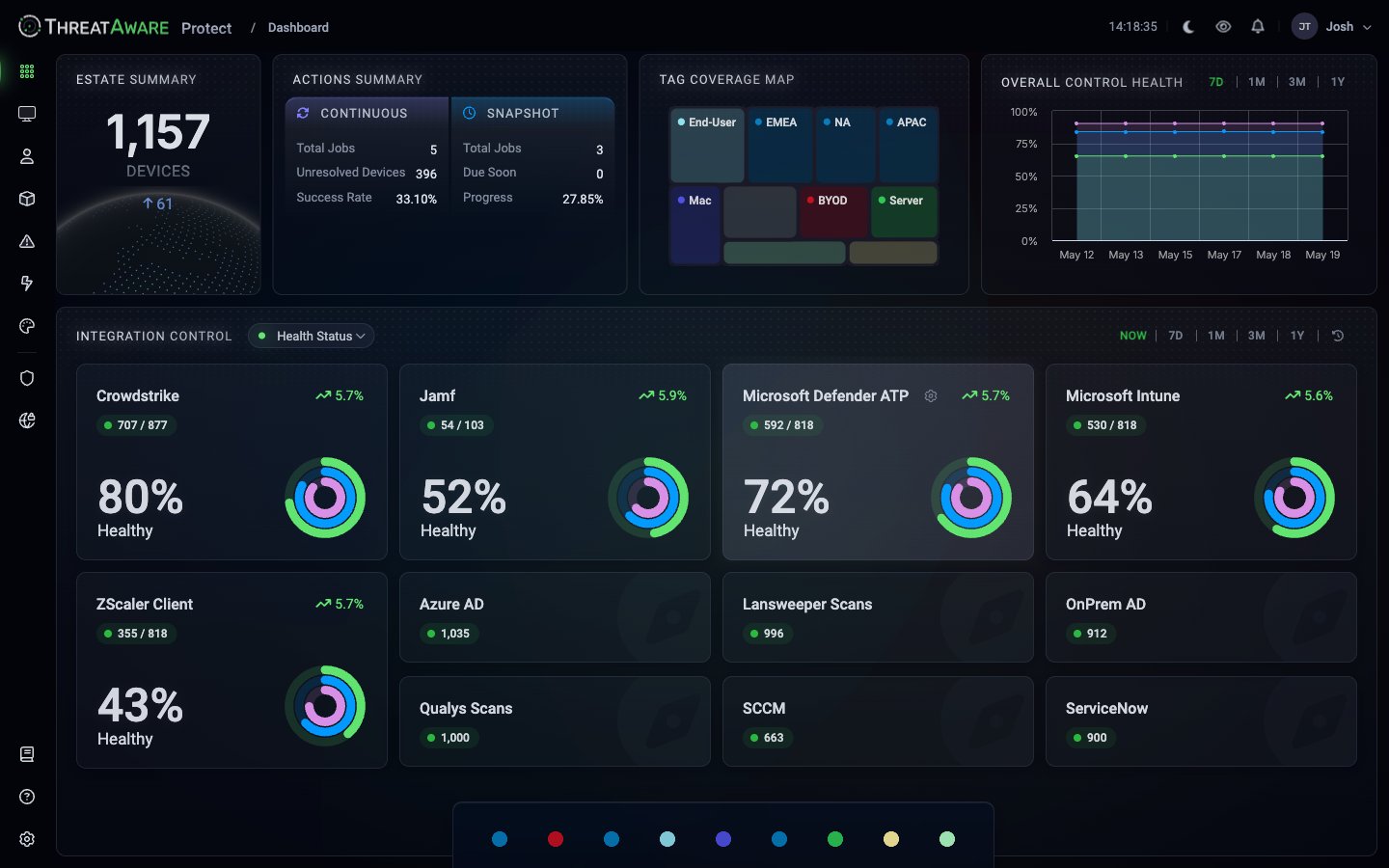
The Dashboard's **Integration Control** panel renders Vitals at portfolio level. Each card shows:
* Integration name + icon
* Health percentage (e.g. `80% Healthy`)
* Device counts (e.g. `707 / 877`)
* Trend arrow vs last period (e.g. `↗ 5.7%`)
* Donut chart visualising the split
Tabs at the top: **NOW** (current state), **7D**, **1M**, **3M**, **1Y** (historical trends).
Clicking any card takes you to **Devices** filtered to that integration's slice.
## What controls Protect monitors
Protect can compute Vitals on any integration that exposes:
* A per-device data feed (so we can compute Deployment + Function)
* Configuration / policy fields (so we can compute Configuration)
In practice that covers:
| Category | Example integrations | Typical configuration checks |
| ---------------------- | ------------------------------------------------------------------------------------------------------------ | --------------------------------------------------------------------------------------------------------------------------------------------------------------------------------------------------------------------------------------- |
| **EDR** | CrowdStrike, Microsoft Defender ATP, SentinelOne, Cortex XDR (Extended Detection and Response), Carbon Black | Real-time protection, prevention policy, tamper protection, agent version, last seen |
| **MDM** | Microsoft Intune, JAMF, MaaS360, Workspace ONE, Kandji | Enrolled, compliant, check-in recency, configuration profiles applied |
| **Encryption** | Microsoft Intune (BitLocker), JAMF (FileVault) | Encryption enabled, key escrowed, algorithm acceptable |
| **Web/Cloud Security** | ZScaler Client, Cisco Umbrella, Cloudflare Zero Trust | Client deployed, connected to cloud, policies enforced |
| **Patch Management** | System Center Configuration Manager (SCCM), Tanium, Microsoft Intune | Whether the patching agent is reporting; whether the device has missing critical / important updates surfaced by the source tool. Protect does not track patch-deployment SLAs — only the missing-vs-not state the source tool exposes. |
Vitals are **per-device** — they validate device-side security controls. Identity providers (Microsoft Entra ID, Okta, Duo, on-premises Active Directory) are used to enrich device records and provide last-user attribution; they aren't Vital integrations themselves.
If your integration is in the [Integrations](/integrations) directory but isn't listed above, check whether Vitals can apply — open a ticket if you need confirmation. New categories are added regularly.
## Configuration approach: declarative
Vitals are configured *declaratively*:
```text theme={null}
For tag "End-User", CrowdStrike must:
- Be deployed
- Have reported in the last 7 days
- Have Prevention policy applied (not detection-only)
- Have agent version within 2 minor releases of current
```
Protect evaluates this against every device carrying the `End-User` tag continuously. There's no scheduled scan, no waiting for a job. As soon as a device's underlying data changes (next sync), its Vital state recomputes.
This is the opposite of imperative monitoring (write a Python script, schedule it nightly, hope it runs). It also means changes propagate fast — relax a rule and the green count jumps; tighten one and you'll see the new gaps within the hour.
## The Vitals lifecycle
| # | Step | Where / How |
| -- | ---------------------------------------- | ------------------------------------------------------------ |
| 1 | Define tag requirements | Settings → Integrations → `/devices` column gear → Configure |
| 2 | Sync runs (hourly) | Automatic |
| 3 | Recompute Deployment / Function / Config | Automatic |
| 4 | Vital state available on device | `/devices` Vitals view + Dashboard Integration Control |
| 5 | Issue records created if not Healthy | `/issues` |
| 6 | Continuous Action picks it up | `/action-center` |
| 7 | Automation fires | Email / Ticket / Webhook |
| 8 | Remediation done in source tool | Your existing vendor console |
| 9 | Next sync — device leaves the query | Automatic |
| 10 | Action MTTR updated, Success Rate ticks | `/action-center` metrics |
## Common misconfigurations to avoid
Newly-discovered devices instantly fail Vitals before deployment finishes. Use a `Stock` tag (or similar) for not-yet-deployed devices where no Vitals are required, and move them out only when baseline is complete.
Tagging everything with "End-User" creates the trap that servers fail end-user requirements. Use orthogonal tags and require per-tag.
Some agents update weekly. Requiring "seen in last 24 hours" produces false positives on healthy devices. 7 days is a reasonable default; tune per integration.
If an integration's API doesn't expose a field, Protect can't check it. Don't add a configuration check expecting silent success — it'll either be absent from the picker or always fail.
## Cross-references
Step-by-step setup
Define scope per control
Canonical state table
The operational queue Vitals feeds
Auto-remediate unhealthy states
Root-cause any unhealthy device
## Why Vitals matters
Traditional posture monitoring stops at *"is the agent installed?"* That's the bare minimum and it misses the most common failure mode in security: **Endpoint Detection and Response (EDR) agents that look healthy in their own console but stopped protecting weeks ago.**
| What the EDR console shows | What's actually happening |
| ------------------------------------------- | -------------------------------------------------------------------------------------------------------------------------------------------------------- |
| `LAPTOP-001 — Online`, last seen 2026-05-19 | CrowdStrike agent on LAPTOP-001 hasn't reported since 2026-05-07. Process is running but can't reach the cloud — returning cached status to the console. |
The single-tool console can't tell you the agent is broken because it doesn't have a reference frame. Protect *does* — by comparing the agent's own activity timeline against the device's activity timeline across all other tools. If Intune saw the device this morning but CrowdStrike hasn't seen it in 12 days, that's the diagnosis.
This is called **silent failure detection** and it's the single most-cited reason customers describe Protect as different.
## The three stages
Is the control present on this device at all? Computed by comparing the device's presence in identity/management sources against its presence in the security tool.
Is the control actively working? Computed from the freshness of the security tool's per-device data versus the device's general activity. Stale tool data on an active device = broken.
Is the control configured per your policy? Driven by the configuration checks you defined in [Vitals Configuration](/vitals-configuration).
See [Reference → Vitals states](/reference/vitals-states) for how the three stages combine into composite states (Healthy, Functioning, Not Functioning, Not Deployed, Not Required).
## Tag-scoped requirements
Not every device needs every control. A server doesn't need Mobile Device Management (MDM). A stock laptop doesn't need anything yet because it isn't deployed. Vitals respect this via [Tags](/tags-and-logic-engine):
| Tag | Typical required controls |
| ---------- | --------------------------------------------- |
| `End-User` | EDR, MDM, Encryption, Web filtering |
| `Server` | EDR, patch management, vulnerability scanning |
| `VM` | EDR (if persistent), vulnerability scanning |
| `Mac` | EDR or Jamf Protect, FileVault, Jamf MDM |
| `BYOD` | Conditional access only |
| `Stock` | *None — not yet deployed* |
A device's tags decide what's required of it. A device only fails Vitals against the controls its tags require. Get the tags right and Vitals are quiet by default — alerts are exclusively meaningful gaps.
## The two grid modes
In [Devices](/device-management), the footer toggle switches between two integration-column views:
| Mode | What each cell shows | When to use |
| -------------- | --------------------------------------------------- | ----------------------------------------------- |
| **Deployment** | ✓ or — — does this tool see this device? | Audit, "prove we have N devices in CrowdStrike" |
| **Vitals** | Healthy / Functioning / Misconfigured / Not Healthy | Triage, "what needs fixing?" |
Start in Deployment to confirm coverage, switch to Vitals to find what's actually broken.
## Dashboard integration health
The Dashboard's **Integration Control** panel renders Vitals at portfolio level. Each card shows:
* Integration name + icon
* Health percentage (e.g. `80% Healthy`)
* Device counts (e.g. `707 / 877`)
* Trend arrow vs last period (e.g. `↗ 5.7%`)
* Donut chart visualising the split
Tabs at the top: **NOW** (current state), **7D**, **1M**, **3M**, **1Y** (historical trends).
Clicking any card takes you to **Devices** filtered to that integration's slice.
## What controls Protect monitors
Protect can compute Vitals on any integration that exposes:
* A per-device data feed (so we can compute Deployment + Function)
* Configuration / policy fields (so we can compute Configuration)
In practice that covers:
| Category | Example integrations | Typical configuration checks |
| ---------------------- | ------------------------------------------------------------------------------------------------------------ | --------------------------------------------------------------------------------------------------------------------------------------------------------------------------------------------------------------------------------------- |
| **EDR** | CrowdStrike, Microsoft Defender ATP, SentinelOne, Cortex XDR (Extended Detection and Response), Carbon Black | Real-time protection, prevention policy, tamper protection, agent version, last seen |
| **MDM** | Microsoft Intune, JAMF, MaaS360, Workspace ONE, Kandji | Enrolled, compliant, check-in recency, configuration profiles applied |
| **Encryption** | Microsoft Intune (BitLocker), JAMF (FileVault) | Encryption enabled, key escrowed, algorithm acceptable |
| **Web/Cloud Security** | ZScaler Client, Cisco Umbrella, Cloudflare Zero Trust | Client deployed, connected to cloud, policies enforced |
| **Patch Management** | System Center Configuration Manager (SCCM), Tanium, Microsoft Intune | Whether the patching agent is reporting; whether the device has missing critical / important updates surfaced by the source tool. Protect does not track patch-deployment SLAs — only the missing-vs-not state the source tool exposes. |
Vitals are **per-device** — they validate device-side security controls. Identity providers (Microsoft Entra ID, Okta, Duo, on-premises Active Directory) are used to enrich device records and provide last-user attribution; they aren't Vital integrations themselves.
If your integration is in the [Integrations](/integrations) directory but isn't listed above, check whether Vitals can apply — open a ticket if you need confirmation. New categories are added regularly.
## Configuration approach: declarative
Vitals are configured *declaratively*:
```text theme={null}
For tag "End-User", CrowdStrike must:
- Be deployed
- Have reported in the last 7 days
- Have Prevention policy applied (not detection-only)
- Have agent version within 2 minor releases of current
```
Protect evaluates this against every device carrying the `End-User` tag continuously. There's no scheduled scan, no waiting for a job. As soon as a device's underlying data changes (next sync), its Vital state recomputes.
This is the opposite of imperative monitoring (write a Python script, schedule it nightly, hope it runs). It also means changes propagate fast — relax a rule and the green count jumps; tighten one and you'll see the new gaps within the hour.
## The Vitals lifecycle
| # | Step | Where / How |
| -- | ---------------------------------------- | ------------------------------------------------------------ |
| 1 | Define tag requirements | Settings → Integrations → `/devices` column gear → Configure |
| 2 | Sync runs (hourly) | Automatic |
| 3 | Recompute Deployment / Function / Config | Automatic |
| 4 | Vital state available on device | `/devices` Vitals view + Dashboard Integration Control |
| 5 | Issue records created if not Healthy | `/issues` |
| 6 | Continuous Action picks it up | `/action-center` |
| 7 | Automation fires | Email / Ticket / Webhook |
| 8 | Remediation done in source tool | Your existing vendor console |
| 9 | Next sync — device leaves the query | Automatic |
| 10 | Action MTTR updated, Success Rate ticks | `/action-center` metrics |
## Common misconfigurations to avoid
Newly-discovered devices instantly fail Vitals before deployment finishes. Use a `Stock` tag (or similar) for not-yet-deployed devices where no Vitals are required, and move them out only when baseline is complete.
Tagging everything with "End-User" creates the trap that servers fail end-user requirements. Use orthogonal tags and require per-tag.
Some agents update weekly. Requiring "seen in last 24 hours" produces false positives on healthy devices. 7 days is a reasonable default; tune per integration.
If an integration's API doesn't expose a field, Protect can't check it. Don't add a configuration check expecting silent success — it'll either be absent from the picker or always fail.
## Cross-references
Step-by-step setup
Define scope per control
Canonical state table
The operational queue Vitals feeds
Auto-remediate unhealthy states
Root-cause any unhealthy device