> ## Documentation Index
> Fetch the complete documentation index at: https://docs.threataware.com/llms.txt
> Use this file to discover all available pages before exploring further.
# Settings
> Where all tenant-wide configuration lives — the left rail of the Settings page mapped to every sub-area
## What's in Settings
The Settings page (cog icon at the bottom of the left rail, `/settings`) is the tenant's control panel. Every persistent configuration choice lives here:
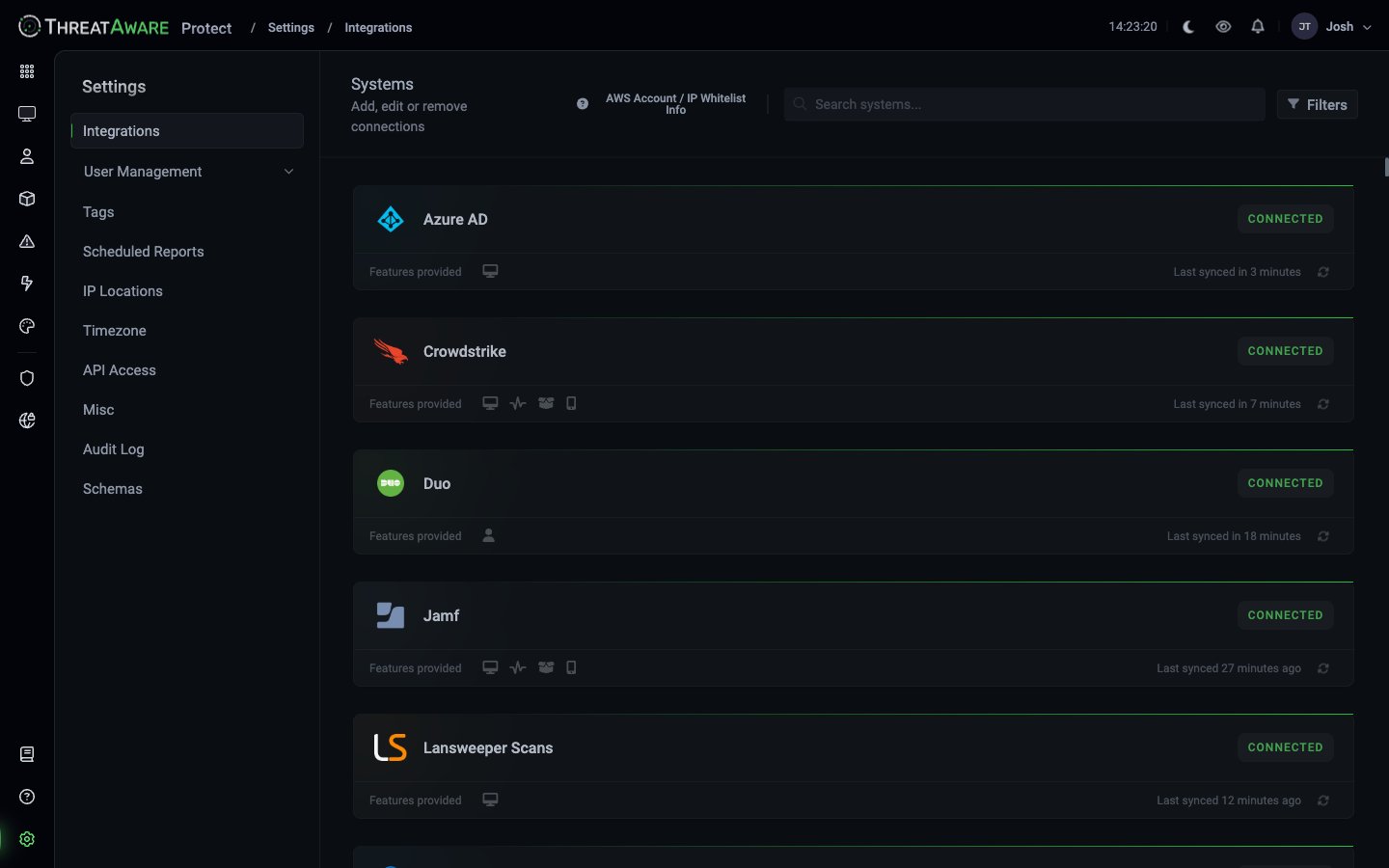 | Sub-area | URL | What it controls |
| ------------------------------------------------ | ----------------------------- | -------------------------------------------------------- |
| [Integrations](/settings/integrations) | `/settings/connections` | Connections to external tools (EDR, MDM, identity, etc.) |
| [Users](/settings/users) | `/settings/users` | Platform users (people who log into Protect) |
| [Roles](/settings/roles) | `/settings/roles` | Default and custom roles |
| [Teams](/settings/teams) | `/settings/teams` | Collaboration groups |
| [Tags](/settings/tags) | `/settings/tags` | Tag definitions and Logic Engine rules |
| [Scheduled Reports](/settings/scheduled-reports) | `/settings/scheduled-reports` | Recurring email exports |
| [IP Locations](/settings/ip-locations) | `/settings/ip-location` | Public IP location overrides |
| [Timezone](/settings/timezone) | `/settings/timezone` | Tenant + user locale |
| [API Access](/settings/api-access) | `/settings/api` | API tokens |
| [Misc](/settings/misc) | `/settings/misc` | Various tenant-wide toggles |
| [Audit Log](/settings/audit-log) | `/settings/audit-log` | Activity history |
| [Schemas](/settings/schemas) | `/settings/schemas` | Device and User data schemas used by AI / Studio |
## Who can access Settings
Settings access is controlled by role:
| Role | What they can do |
| ------------------------------- | ----------------------------------------------------------------------------------------------------------------------- |
| **Super Admin** | Everything |
| **Analyst** | Typically view + manage Scheduled Reports, view Tags, manage API tokens for their own actions; varies per tenant policy |
| **Viewer** / **Limited Viewer** | View their own profile only |
| **Custom roles** | Whatever you grant |
Configure custom permissions at [Settings → Roles](/settings/roles) → Create Role.
## The two "Users" — disambiguation
A common source of confusion:
* **[Settings → Users](/settings/users)** — *Platform users* (people who log into Protect)
* **[User Inventory](/user-inventory)** — *End-user inventory* (every person across your organisation, pulled from identity sources)
The names overlap; the concepts are distinct.
## Tenant-wide settings to review on day one
After onboarding, walk through these in order:
1. **[Misc → Inactive device threshold](/settings/misc)** — default 30 days. Right for most; loosen for environments with extended-offline devices.
2. **[Misc → Change default homepage](/settings/misc)** — pick Dashboard or Device Explorer.
3. **[Timezone](/settings/timezone)** — set client locale.
4. **[Tags](/settings/tags)** — review default tags, create the ones your organisation needs.
5. **[Roles → Default roles](/settings/roles)** — confirm the four defaults work for you, create custom ones where needed.
6. **[Scheduled Reports](/settings/scheduled-reports)** — set up one starter recurring export.
7. **[API Access](/settings/api-access)** — generate tokens for any automation you'll run.
## Cross-references
The conceptual overview of users / roles / teams
The conceptual overview of connections
The conceptual overview of tag rules
| Sub-area | URL | What it controls |
| ------------------------------------------------ | ----------------------------- | -------------------------------------------------------- |
| [Integrations](/settings/integrations) | `/settings/connections` | Connections to external tools (EDR, MDM, identity, etc.) |
| [Users](/settings/users) | `/settings/users` | Platform users (people who log into Protect) |
| [Roles](/settings/roles) | `/settings/roles` | Default and custom roles |
| [Teams](/settings/teams) | `/settings/teams` | Collaboration groups |
| [Tags](/settings/tags) | `/settings/tags` | Tag definitions and Logic Engine rules |
| [Scheduled Reports](/settings/scheduled-reports) | `/settings/scheduled-reports` | Recurring email exports |
| [IP Locations](/settings/ip-locations) | `/settings/ip-location` | Public IP location overrides |
| [Timezone](/settings/timezone) | `/settings/timezone` | Tenant + user locale |
| [API Access](/settings/api-access) | `/settings/api` | API tokens |
| [Misc](/settings/misc) | `/settings/misc` | Various tenant-wide toggles |
| [Audit Log](/settings/audit-log) | `/settings/audit-log` | Activity history |
| [Schemas](/settings/schemas) | `/settings/schemas` | Device and User data schemas used by AI / Studio |
## Who can access Settings
Settings access is controlled by role:
| Role | What they can do |
| ------------------------------- | ----------------------------------------------------------------------------------------------------------------------- |
| **Super Admin** | Everything |
| **Analyst** | Typically view + manage Scheduled Reports, view Tags, manage API tokens for their own actions; varies per tenant policy |
| **Viewer** / **Limited Viewer** | View their own profile only |
| **Custom roles** | Whatever you grant |
Configure custom permissions at [Settings → Roles](/settings/roles) → Create Role.
## The two "Users" — disambiguation
A common source of confusion:
* **[Settings → Users](/settings/users)** — *Platform users* (people who log into Protect)
* **[User Inventory](/user-inventory)** — *End-user inventory* (every person across your organisation, pulled from identity sources)
The names overlap; the concepts are distinct.
## Tenant-wide settings to review on day one
After onboarding, walk through these in order:
1. **[Misc → Inactive device threshold](/settings/misc)** — default 30 days. Right for most; loosen for environments with extended-offline devices.
2. **[Misc → Change default homepage](/settings/misc)** — pick Dashboard or Device Explorer.
3. **[Timezone](/settings/timezone)** — set client locale.
4. **[Tags](/settings/tags)** — review default tags, create the ones your organisation needs.
5. **[Roles → Default roles](/settings/roles)** — confirm the four defaults work for you, create custom ones where needed.
6. **[Scheduled Reports](/settings/scheduled-reports)** — set up one starter recurring export.
7. **[API Access](/settings/api-access)** — generate tokens for any automation you'll run.
## Cross-references
The conceptual overview of users / roles / teams
The conceptual overview of connections
The conceptual overview of tag rules