> ## Documentation Index
> Fetch the complete documentation index at: https://docs.threataware.com/llms.txt
> Use this file to discover all available pages before exploring further.
# Settings → API Access
> Generate and manage API keys for programmatic access to the Protect API
## The page
At `/settings/api`:
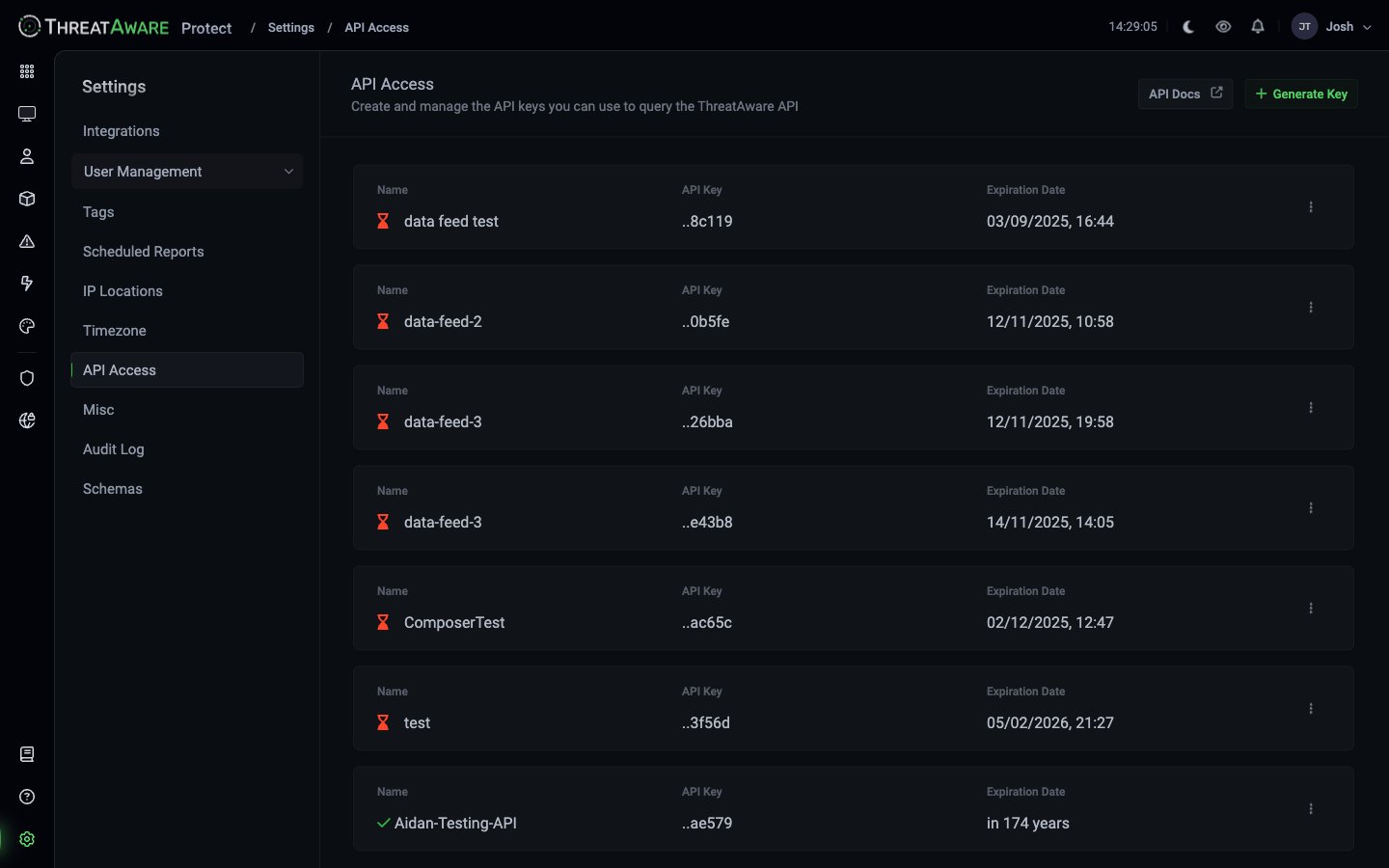 *"Create and manage the API keys you can use to query the ThreatAware API."*
Each row shows:
| Column | Meaning |
| ------------------- | ----------------------------------------------------------------------------------------- |
| **Name** | Token identifier (descriptive label) |
| **API Key** | Last 4-6 characters (full key shown only at creation) |
| **Expiration Date** | When the token stops working — shown as a date plus a relative hint (e.g. `in 174 years`) |
| Row hover | Reveals **Disable key** (active tokens only) and **Delete key** buttons |
Top-right buttons:
* **API Docs ↗** — opens the API reference (Postman documentation at `apidocs.threataware.com`)
* **+ Generate Key** — create a new token
## Generating a token
The dialog opens with a name field and an Expiration dropdown.
Use a description that identifies the **owner** and **purpose** — `[Power Automate] Daily inventory sync`, `[Data warehouse] Hourly device ingest`, `[Personal] Notebook explorations`.
The dropdown surfaces four fixed options:
* **1 day**
* **1 week**
* **1 month**
* **Never**
The default is **1 day**. There is no custom-date input. Tokens with the `Never` option show "in 174 years" in the Expiration Date column (the underlying timestamp is set far in the future). **Prefer short-lived tokens** wherever possible.
The full key is revealed once in a follow-up dialog with the warning "Copy this key, it will only appear once." Copy and store in your secret manager immediately — Protect cannot recover it.
The token inherits the scope of the user who creates it. For least-privilege automation, **create the token under a dedicated service-account user with a narrow custom role.**
### Token format
Generated tokens are two UUIDs concatenated with a hyphen, e.g. `55b736f9-994c-2cca-af80-83c19d3c6705-8604c319-260d-42ed-a670-c9cc8d1acabd`. The displayed `..ac65c` suffix on the row is the trailing fragment of this string.
## Using the API
```bash theme={null}
curl -H "X-ThreatAware-ApiKey: YOUR_TOKEN_HERE" \
-H "Accept: application/json" \
"https://your-cloud-id.threataware.com/public-api/v1/users?limit=10"
```
Notes verified against the live API:
* The auth header is `X-ThreatAware-ApiKey` (exact case).
* The current public API version is `v1`. v1 is GET-only.
* v1 uses **Offset + Limit** pagination, capped at 10,000 records. Responses include a `warning` field directing high-offset consumers to migrate to v1.1 cursor pagination.
* Successful responses are JSON: `{cursor, limit, total, warning?, data: [...]}`.
The full API surface is documented in the [API Reference](/api-reference/introduction) and at apidocs.threataware.com.
## Disabling / deleting
Hovering a token row reveals two buttons (active tokens only):
* **Disable key** — keeps the row but invalidates the key. Useful when you want to retain audit trail / re-enable later.
* **Delete key** — removes the token entirely after a Confirm dialog (`Do you want to delete the following key: ?`).
Expired tokens show only the **Delete key** button.
There is **no Edit affordance and no Regenerate affordance** in the current build — if you need to rotate a key, create a new one and delete the old one separately.
## Security best practices
Default to 1 day or 1 week for development; 1 month for production batch jobs. The `Never` option is dangerous — a leaked token persists indefinitely. Rotate regularly.
Don't share tokens across multiple consumers. If one consumer is compromised or retired, you can delete just that token.
Don't generate tokens against your personal user. Create a `svc-warehouse@company.com` user, assign a narrow custom role, and issue the token from there. When you leave, the token survives.
Hash-check your public source repos. Tokens accidentally committed to GitHub get scraped fast. Delete immediately if discovered.
Browser-side, mobile, anywhere a user can see. Always proxy through a server you control.
The [Audit Log](/settings/audit-log) records API token lifecycle events.
## Token lifecycle
| Stage | Action | Effect |
| --------------------- | ------------------------------ | ------------------------------------------------------------------------ |
| **Create** | Token issued | Copy to a secret manager immediately — Protect only shows the value once |
| **Active** | Token in use | Sends requests via the `X-ThreatAware-ApiKey` header |
| **Disable** (per-row) | Reversible suspend | Stops authentication without deleting the token |
| **Delete** (per-row) | Terminal — confirmation prompt | Token removed permanently; no further access |
| **Expired** | Reached its end date | No further access |
## Cross-references
Endpoint documentation
Permissions model
Monitor token activity
*"Create and manage the API keys you can use to query the ThreatAware API."*
Each row shows:
| Column | Meaning |
| ------------------- | ----------------------------------------------------------------------------------------- |
| **Name** | Token identifier (descriptive label) |
| **API Key** | Last 4-6 characters (full key shown only at creation) |
| **Expiration Date** | When the token stops working — shown as a date plus a relative hint (e.g. `in 174 years`) |
| Row hover | Reveals **Disable key** (active tokens only) and **Delete key** buttons |
Top-right buttons:
* **API Docs ↗** — opens the API reference (Postman documentation at `apidocs.threataware.com`)
* **+ Generate Key** — create a new token
## Generating a token
The dialog opens with a name field and an Expiration dropdown.
Use a description that identifies the **owner** and **purpose** — `[Power Automate] Daily inventory sync`, `[Data warehouse] Hourly device ingest`, `[Personal] Notebook explorations`.
The dropdown surfaces four fixed options:
* **1 day**
* **1 week**
* **1 month**
* **Never**
The default is **1 day**. There is no custom-date input. Tokens with the `Never` option show "in 174 years" in the Expiration Date column (the underlying timestamp is set far in the future). **Prefer short-lived tokens** wherever possible.
The full key is revealed once in a follow-up dialog with the warning "Copy this key, it will only appear once." Copy and store in your secret manager immediately — Protect cannot recover it.
The token inherits the scope of the user who creates it. For least-privilege automation, **create the token under a dedicated service-account user with a narrow custom role.**
### Token format
Generated tokens are two UUIDs concatenated with a hyphen, e.g. `55b736f9-994c-2cca-af80-83c19d3c6705-8604c319-260d-42ed-a670-c9cc8d1acabd`. The displayed `..ac65c` suffix on the row is the trailing fragment of this string.
## Using the API
```bash theme={null}
curl -H "X-ThreatAware-ApiKey: YOUR_TOKEN_HERE" \
-H "Accept: application/json" \
"https://your-cloud-id.threataware.com/public-api/v1/users?limit=10"
```
Notes verified against the live API:
* The auth header is `X-ThreatAware-ApiKey` (exact case).
* The current public API version is `v1`. v1 is GET-only.
* v1 uses **Offset + Limit** pagination, capped at 10,000 records. Responses include a `warning` field directing high-offset consumers to migrate to v1.1 cursor pagination.
* Successful responses are JSON: `{cursor, limit, total, warning?, data: [...]}`.
The full API surface is documented in the [API Reference](/api-reference/introduction) and at apidocs.threataware.com.
## Disabling / deleting
Hovering a token row reveals two buttons (active tokens only):
* **Disable key** — keeps the row but invalidates the key. Useful when you want to retain audit trail / re-enable later.
* **Delete key** — removes the token entirely after a Confirm dialog (`Do you want to delete the following key: ?`).
Expired tokens show only the **Delete key** button.
There is **no Edit affordance and no Regenerate affordance** in the current build — if you need to rotate a key, create a new one and delete the old one separately.
## Security best practices
Default to 1 day or 1 week for development; 1 month for production batch jobs. The `Never` option is dangerous — a leaked token persists indefinitely. Rotate regularly.
Don't share tokens across multiple consumers. If one consumer is compromised or retired, you can delete just that token.
Don't generate tokens against your personal user. Create a `svc-warehouse@company.com` user, assign a narrow custom role, and issue the token from there. When you leave, the token survives.
Hash-check your public source repos. Tokens accidentally committed to GitHub get scraped fast. Delete immediately if discovered.
Browser-side, mobile, anywhere a user can see. Always proxy through a server you control.
The [Audit Log](/settings/audit-log) records API token lifecycle events.
## Token lifecycle
| Stage | Action | Effect |
| --------------------- | ------------------------------ | ------------------------------------------------------------------------ |
| **Create** | Token issued | Copy to a secret manager immediately — Protect only shows the value once |
| **Active** | Token in use | Sends requests via the `X-ThreatAware-ApiKey` header |
| **Disable** (per-row) | Reversible suspend | Stops authentication without deleting the token |
| **Delete** (per-row) | Terminal — confirmation prompt | Token removed permanently; no further access |
| **Expired** | Reached its end date | No further access |
## Cross-references
Endpoint documentation
Permissions model
Monitor token activity