> ## Documentation Index
> Fetch the complete documentation index at: https://docs.threataware.com/llms.txt
> Use this file to discover all available pages before exploring further.
# Settings → Tags
> Tag definitions and the Logic Engine — the rules that decide which devices and users carry which tags
## The Tag Management page
At `/settings/tags`:
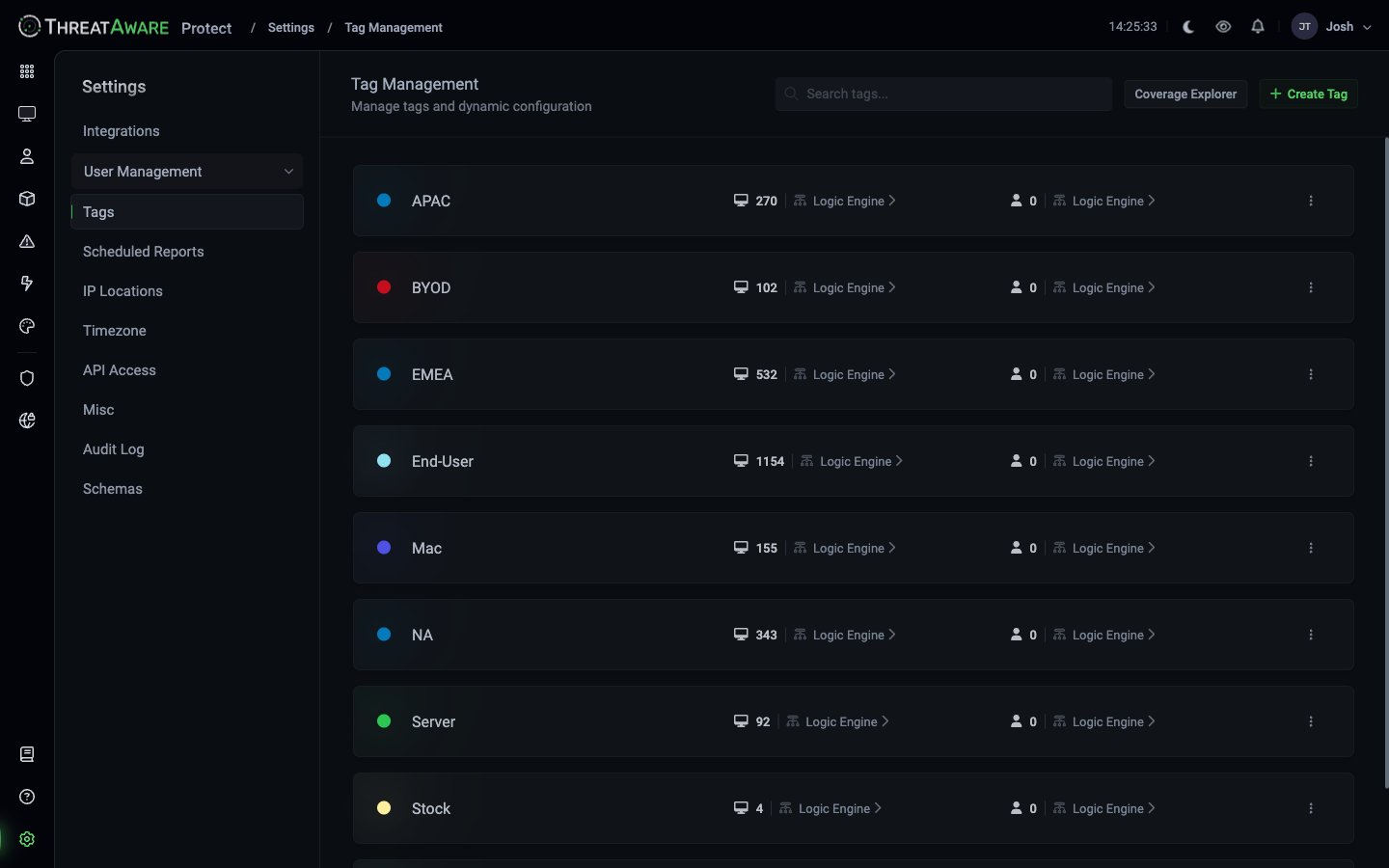 Each row is a tag with:
| Column | Meaning |
| ------------------------------- | ----------------------------------------------------------------------- |
| Coloured dot | Tag display colour |
| Tag name | The literal string used in queries (`tags:End-User`) |
| Device count + `Logic Engine ▸` | Number of devices currently matching the device-side rule; link to edit |
| User count + `Logic Engine ▸` | Number of users currently matching the user-side rule; link to edit |
| **⋮** menu | Edit name/colour, Delete |
Top-right buttons:
* **Coverage Explorer** — visualise tag overlap and uncovered devices
* **+ Create Tag** — define a new tag from scratch
## How the Logic Engine works
Click any tag's **Logic Engine ▸** to open the rule editor.
The Logic Engine uses the same [query language](/query-language) used everywhere else. A rule looks like:
```text theme={null}
os:Windows AND NOT tags:Stock AND NOT tags:BYOD
```
Devices that match the rule get the tag; devices that don't, don't. **No manual tagging at scale.**
Re-evaluation is continuous — typically within one sync window of any underlying change.
## Creating a new tag
Top-right.
Pick a short, memorable name. The colour is used throughout the product (dashboard, tag chips, coverage maps).
Click **Logic Engine ▸** on the device side. Build a query using fields like:
* `os` — enum: `Windows`, `MacOs`, `Linux`
* `osVersion` — operating system version string
* `location.country`, `location.city`, `location.countryCode`
* `lastUser.email`, `lastUser.department`, `lastUser.jobTitle`
* `tags` — compose with other tags (e.g. `tags:End-User AND NOT tags:Stock`)
* `system..deployed` etc. — boolean Vitals state
Use autocomplete in the rule editor to discover the full field set — see [Query Syntax](/reference/query-syntax) for the canonical list.
For tags that should also apply to users (e.g. `Executive`, `Phishing-Campaign-Q2`), define a rule against user fields.
After saving, open Coverage Explorer to confirm the device count looks plausible.
## Coverage Explorer
The Coverage Explorer (top-right of the Tags page) shows two critical visualisations:
| View | What you see |
| ----------------- | ----------------------------------------------------- |
| **Tag overlap** | A matrix of tag pairs and how many devices match both |
| **Coverage gaps** | Devices that match zero tags — the un-tagged residue |
After every tag-rule change, sanity-check the Coverage Explorer:
* The total tagged-device count shouldn't drop unexpectedly
* The "zero tags" cohort shouldn't balloon
* Overlaps should match your mental model — `End-User` ∩ `Server` should be ≈ 0; `End-User` ∩ `EMEA` should be non-trivial
## Best practices
Tag dimensions should be independent: device class × region × ownership × OS family × sensitivity. A device carries one tag per dimension. Bad: `Mac-Laptop` and `Windows-Laptop` and `Linux-Laptop` (compound). Good: `Mac` + `Laptop`, `Windows` + `Laptop`.
Vitals fire on `required:true AND deployed:false`. Brand-new devices should land in tags that don't yet require the security controls (typically `Stock`) until deployment is complete. Move them out of `Stock` (via the Logic Engine, not manual) only after baseline is done.
Good: `End-User`, `Executive`, `Production-Server`. Bad: `Has-CrowdStrike`, `Intune-Compliant` — query those fields directly.
A `VIP-EndUser` tag can be defined as `tags:End-User AND tags:VIP`. Composition keeps the underlying rules small.
Deleting a tag breaks Vitals requirements, saved views, and Actions that reference it. Rename or deprecate; delete only after migrating references.
## Cross-references
Conceptual deep dive
Tag-based requirements
The grammar the Logic Engine uses
Each row is a tag with:
| Column | Meaning |
| ------------------------------- | ----------------------------------------------------------------------- |
| Coloured dot | Tag display colour |
| Tag name | The literal string used in queries (`tags:End-User`) |
| Device count + `Logic Engine ▸` | Number of devices currently matching the device-side rule; link to edit |
| User count + `Logic Engine ▸` | Number of users currently matching the user-side rule; link to edit |
| **⋮** menu | Edit name/colour, Delete |
Top-right buttons:
* **Coverage Explorer** — visualise tag overlap and uncovered devices
* **+ Create Tag** — define a new tag from scratch
## How the Logic Engine works
Click any tag's **Logic Engine ▸** to open the rule editor.
The Logic Engine uses the same [query language](/query-language) used everywhere else. A rule looks like:
```text theme={null}
os:Windows AND NOT tags:Stock AND NOT tags:BYOD
```
Devices that match the rule get the tag; devices that don't, don't. **No manual tagging at scale.**
Re-evaluation is continuous — typically within one sync window of any underlying change.
## Creating a new tag
Top-right.
Pick a short, memorable name. The colour is used throughout the product (dashboard, tag chips, coverage maps).
Click **Logic Engine ▸** on the device side. Build a query using fields like:
* `os` — enum: `Windows`, `MacOs`, `Linux`
* `osVersion` — operating system version string
* `location.country`, `location.city`, `location.countryCode`
* `lastUser.email`, `lastUser.department`, `lastUser.jobTitle`
* `tags` — compose with other tags (e.g. `tags:End-User AND NOT tags:Stock`)
* `system..deployed` etc. — boolean Vitals state
Use autocomplete in the rule editor to discover the full field set — see [Query Syntax](/reference/query-syntax) for the canonical list.
For tags that should also apply to users (e.g. `Executive`, `Phishing-Campaign-Q2`), define a rule against user fields.
After saving, open Coverage Explorer to confirm the device count looks plausible.
## Coverage Explorer
The Coverage Explorer (top-right of the Tags page) shows two critical visualisations:
| View | What you see |
| ----------------- | ----------------------------------------------------- |
| **Tag overlap** | A matrix of tag pairs and how many devices match both |
| **Coverage gaps** | Devices that match zero tags — the un-tagged residue |
After every tag-rule change, sanity-check the Coverage Explorer:
* The total tagged-device count shouldn't drop unexpectedly
* The "zero tags" cohort shouldn't balloon
* Overlaps should match your mental model — `End-User` ∩ `Server` should be ≈ 0; `End-User` ∩ `EMEA` should be non-trivial
## Best practices
Tag dimensions should be independent: device class × region × ownership × OS family × sensitivity. A device carries one tag per dimension. Bad: `Mac-Laptop` and `Windows-Laptop` and `Linux-Laptop` (compound). Good: `Mac` + `Laptop`, `Windows` + `Laptop`.
Vitals fire on `required:true AND deployed:false`. Brand-new devices should land in tags that don't yet require the security controls (typically `Stock`) until deployment is complete. Move them out of `Stock` (via the Logic Engine, not manual) only after baseline is done.
Good: `End-User`, `Executive`, `Production-Server`. Bad: `Has-CrowdStrike`, `Intune-Compliant` — query those fields directly.
A `VIP-EndUser` tag can be defined as `tags:End-User AND tags:VIP`. Composition keeps the underlying rules small.
Deleting a tag breaks Vitals requirements, saved views, and Actions that reference it. Rename or deprecate; delete only after migrating references.
## Cross-references
Conceptual deep dive
Tag-based requirements
The grammar the Logic Engine uses