Tier: Issues is derived from Vitals state — included with Discover and Protect. Customers on Connect do not see Issues.

What an Issue is

An Issue is a discrete, named problem detected on a specific device by a specific integration. Examples:
  • Agent Inactive — “Agent not seen for over 30 days but device has been online”
  • Agent Missing — “Agent not installed on computer”
  • Device Not Registered — “Computer [name] is not registered”
  • Not Compliant — “Device compliance status is: “unknown""
  • Not Encrypted — “Device is not encrypted”
  • Feature Disabled — vendor-side feature should be on but isn’t
  • Exposure Level — vendor exposure score for the device
  • ZDX Disabled / ZDX Inactive — ZScaler Client Digital Experience checks
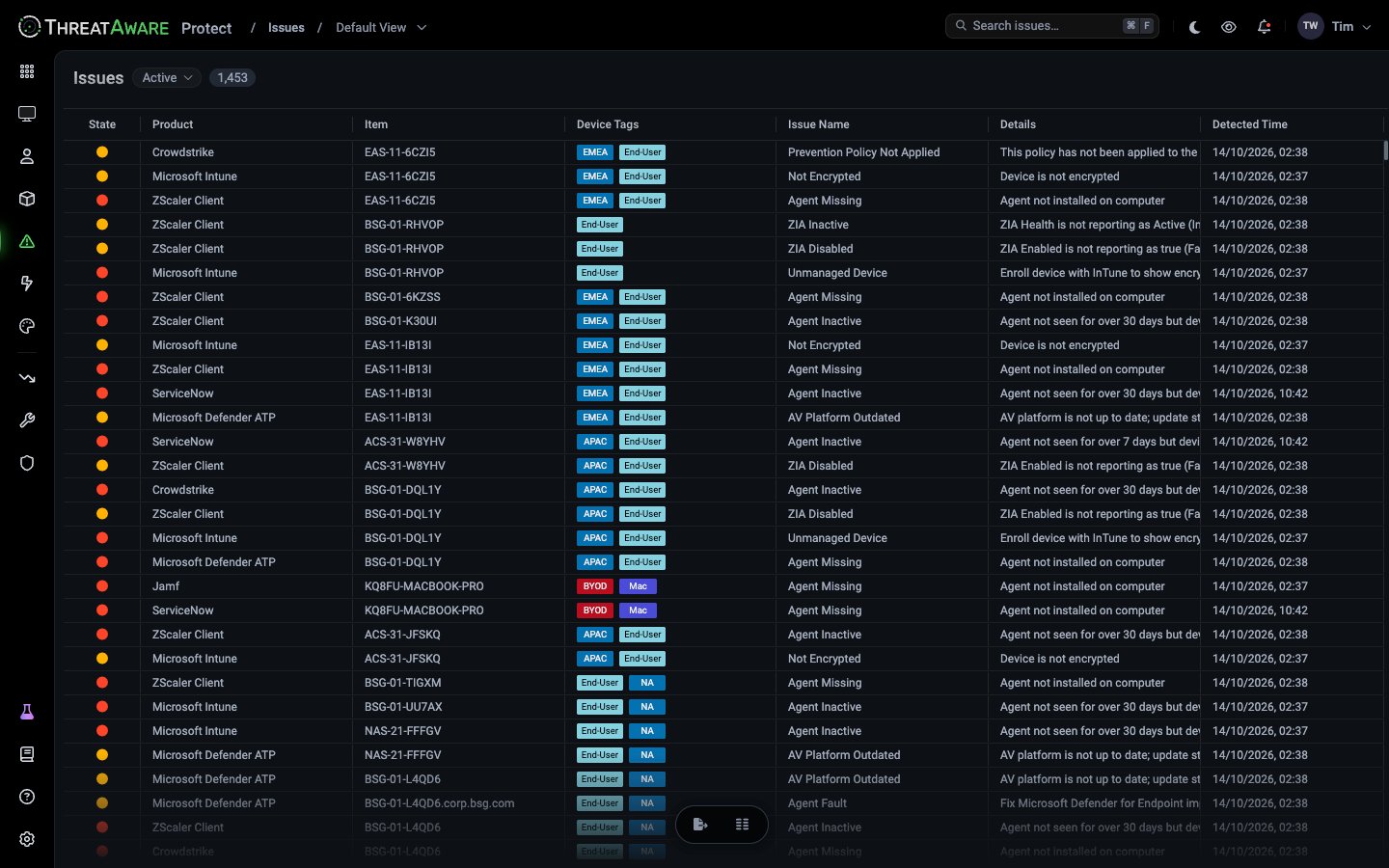
Issue names are vendor-specific — the catalogue you see depends on which integrations are connected. Issues page grid with state dot, product, item, device tags, issue name, details, and detected time columns

Grid layout

The grid supports the same column editor, sorts, and saved views as Devices.

State indicator

The State column shows a coloured dot. Two states are visible in the live demo:

Filtering

The Issues grid has a plain Search issues… box for substring filtering. The top-left Active ▾ pill scopes the grid. For more structured filtering, build a saved view from the column filters in the grid header.

From Issue → Action

The Issues grid integrates with the Action Center:
  1. Build a filter that captures the issue cohort you want to remediate
  2. Use the footer’s Create Action flow (same as Devices)
  3. Pick Continuous so future matching issues are auto-added
  4. Choose automation — email, ticket, webhook, Power Automate
When the underlying Issue resolves (e.g. CrowdStrike starts reporting again), the device automatically leaves the Action, the Action’s Success Rate ticks up, and the MTTR drops.

What Issues are vs. what Vitals are

A device with an unhealthy Vital usually has one or more underlying Issues. The Issues page is the operational queue; Vitals are the structured posture model.

Common triage workflows

  1. Sort by Detected Time ascending so the oldest issues bubble up
  2. For each row: click the device → review the X-Ray panel → confirm root cause
  3. If multiple devices show the same issue name from the same integration, escalate to engineering (it’s likely a tool-side problem, not field-side)
  4. Otherwise create or assign to an existing Action
  1. Filter by Product = Crowdstrike (or Defender, Intune, etc.)
  2. Filter by Issue Name = Agent Inactive / Agent Missing
  3. Group by Device Tags to spot hotspots (a region or device-class with disproportionate broken agents)
  4. Create a Snapshot Action with a deadline for remediation
  1. Filter by date range covering the audit period using the Detected Time column filter
  2. Export CSV
  3. Pair with Action Center automation log to show what was done about each Issue
  4. Reference Audit Log for platform-level actions

Cross-references

Security Monitoring

Configure the Vitals that surface Issues

X-Ray

See the raw data behind any Issue

Action Center

Turn Issues into automated remediation