

Turn on Vitals in Devices
Go to Devices and click Vitals in the toolbar at the bottom of the screen. The integration columns switch from showing whether a tool is present to showing its Vitals state:
Hover over a cell to see the state and when the tool last saw the device. Click the + beside it to see that tool’s data for the device, which of its checks pass or fail, and a link to X-Ray.
For what each state means in the query language, see Vitals states.
Open an integration’s Vitals
In Vitals mode, integrations that have Vitals show a red Vitals icon in their column header. Click it to open that integration’s Vitals. The grid filters to the devices it’s required on, with Scope on the left and Vitals on the right.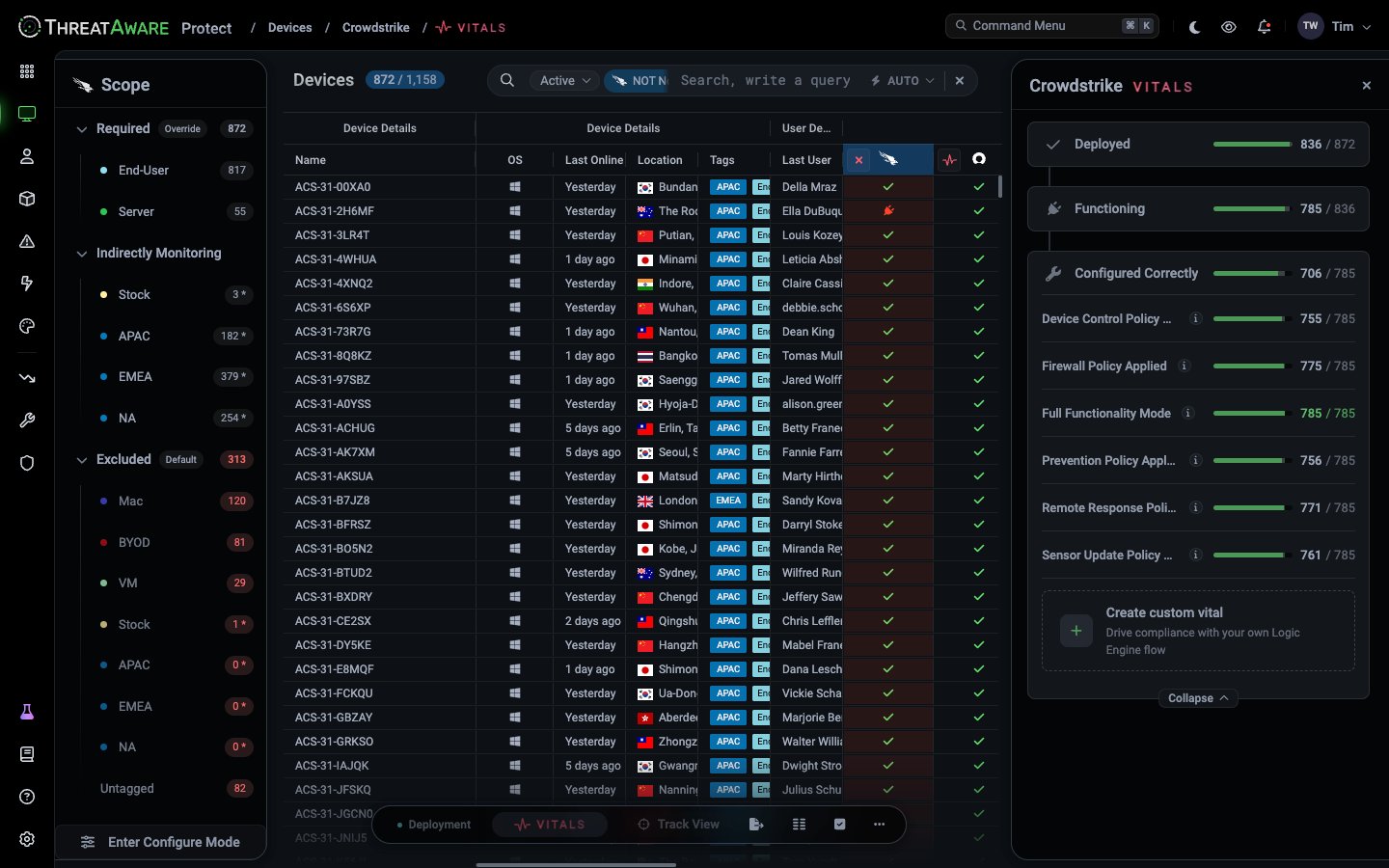
Click a stage to see View N not Deployed (or not Functioning), which filters the grid to the devices that fail it. Click Expand under Configured Correctly to see each check with its own pass count and a View N not compliant link. For CrowdStrike, for example, the checks include Prevention Policy Applied, Firewall Policy Applied and Sensor Update Policy Applied.
Each check has an ⓘ icon that explains what it tests. The checks available depend on what the integration reports.
What “Functioning” catches
A tool can be installed and still not working: the agent has crashed, been disabled, or stopped checking in. Its own console may not tell you. ThreatAware compares when the tool last saw the device with when your other tools did. If the device is clearly active but this tool has gone quiet, it’s Not Functioning. These devices also appear in Issues as Agent Inactive, for example “Agent not seen for over 30 days but device has been online”.Choose which devices need each tool
The Scope panel shows which tags the integration is required on:- Required: devices with these tags must have the tool.
- Excluded: devices with these tags don’t need it, such as
Macfor a Windows-only tool, orStockfor devices that aren’t in use yet. - Indirectly Monitoring: excluded tags where some devices are still checked because they also carry a required tag. The count, marked *, shows how many. Required wins over excluded.
- Untagged: devices with no tags.
1
Set the default
Requirement Strategy decides what happens to devices you haven’t placed. Default Excluded means only the tags you mark as required need the tool. Default Required means every device needs it unless you exclude its tag.
2
Place your tags
Drag tags between Required and Excluded.
3
Choose what to check
Validation Strategy sets how far the checks go: All stages, Deployment and Functioning, or Deployment Only. In the Vitals panel, you can also turn each stage and configuration check Monitoring on or Monitoring off.
4
Finish
Click Exit Configure Mode. The counts and the grid update to match.
Custom Vitals
New in 3.3 You’re no longer limited to the checks ThreatAware ships. If a property exists in ThreatAware, you can build a check on it and flag an issue on every device that fails it, for example to prove a specific policy is applied everywhere. Build the check node by node, or describe it to Composer and let it build the flow for you. A Custom Vital is an extra check you add to an integration’s Configured Correctly stage, built as a Logic Engine flow. It sits in the list beside that integration’s built-in checks and works the same way: the same pass and fail counts, an alert (a flagged issue) for each failing device, and drill-through to the devices that fall short.A Custom Vital belongs to one integration and counts towards that integration’s Configured Correctly score. A device that fails it shows that integration as not configured correctly, so build the check on the integration whose data it uses and whose score it should affect.
Custom Vitals are available on Protect only.You need the Manage permission for Vitals to save a Custom Vital. The default Super Admin and Analyst roles have it; Viewer and Limited Viewer don’t. See Role permissions.
Create a Custom Vital
1
Open the integration's Vitals
Go to Devices and turn on Vitals in the toolbar at the bottom of the screen. In the column headers, click the red vital icon next to the integration you want, such as CrowdStrike. Its Vitals panel opens on the right, showing Deployed, Functioning and Configured Correctly.
2
Create the vital
Under Configured Correctly, click Expand, then click Create custom vital at the bottom of the list. The editor opens with a starter flow: Device → Condition → Flag Issue.
3
Name it
Click the pencil next to Untitled and give the vital a name that says what passing means, such as “No quick scan error”.
4
Build the check
In each Condition node, pick a property, an operator and a value. The property list only shows fields from this integration. Add a second value to the same condition and the operator becomes Equals any of.To add another step, click + under a node’s True or False output and choose a node, such as another Condition or a Flag Issue. Right-click the canvas and choose Auto Layout to tidy the flow.
5
Say what failing devices should see
Type a short message in the Flag Issue node, such as “There was an error with the last quick scan”. Devices that reach this node fail the vital and are flagged with this message.
6
Test it on real devices
Right-click the canvas, choose Debug, and pick a device. The flow highlights the path that device takes, so you can see whether it would pass or fail before anything goes live. Click the × on the Debug mode bar to finish.
7
Publish
When the validation errors counter at the top has cleared, click Publish. ThreatAware evaluates the new vital across your devices. While it does, a Processing Changes badge shows in the Vitals scope panel and the counts are hidden.Processing usually takes anywhere from a few seconds to about 10 minutes, depending on how many devices you have and what else ThreatAware is working on at the time.
Writing a good Custom Vital
Custom Vitals can test almost any property, which makes them easy to get subtly wrong. These habits keep them accurate and easy for others to follow.Name the healthy state, flag the unhealthy one
Name the healthy state, flag the unhealthy one
The vital’s name is what you’re checking for, so it describes a passing device, like the built-in checks do: “No quick scan error” or “VPN configured”. The conditions then look for the problem, and lead to Flag Issue when they find it. For example, “VPN configured” flags devices where
VPN state Equals Unknown.Build on values that don't need updating
Build on values that don't need updating
The best checks test something with a fixed right answer: a scan reported an error, a setting is off, a state is unknown. Avoid checks that compare against a moving target, such as the latest agent version or a list of current Windows builds. Nothing tells ThreatAware what “latest” is, the right version can differ between Windows, macOS and Linux, and someone has to edit the vital every time a new release ships.If the vendor reports a flag such as “engine up to date”, use that instead. If a customer has a firm requirement that can only be met with a version-based check, it can be done, but set a reminder to review it.
Put the detail in the issue message
Put the detail in the issue message
The Flag Issue message is what people see when they hover over a failing vital in the Vitals panel. You can include the device’s own values in it, such as the error text from the last scan, so the message explains the specific failure rather than repeating the vital’s name.
Use case: No quick scan error
Microsoft Defender reports the error from each device’s last quick scan. On a healthy device the field is empty, so any value means the scan went wrong. That makes it a good check: the right answer never changes, so the vital never needs updating. Build it on Defender:
Devices whose last quick scan failed now fail Defender’s Configured Correctly stage, and hovering over the issue shows the actual error.
Built-in checks
The built-in checks in the list have an ⓘ icon that explains what they test. You can turn a built-in check off in Configure Mode, but you can’t change what it tests. To check something differently, add a Custom Vital beside it.Check your changes
After you change a scope or add a Custom Vital:- Open the integration’s Vitals and check the pass counts look sensible. A sudden drop usually means a check or scope is too strict.
- Use the View N not compliant links to look at a few failing devices, and open them in X-Ray to see the raw data.
- Follow the failing devices with a Tracked View, or send a Scheduled Report of them each week.
Cross-references
Security Monitoring
The conceptual model
Tags
Tag the devices first
Reference → Vitals states
Canonical state table